Your edge starts
with the right tool.
Professional TradingView indicators with built-in BUY/SELL signals, TP and SL levels and webhook alerts. Configure them to your strategy, follow tested setups, or connect a bot. Non-repainting, any market, any timeframe.
7 days free · No credit card · Access granted manually within a few hours
BUILT FOR TRADINGVIEW · WORKS WITH YOUR BOT


Up and running in three steps
Start a trial or pick a plan
Create an account and start the 7-day free trial, or choose Starter, Pro or Elite. Monthly or lifetime.
Add your TradingView username
We grant private access to your indicators on your TradingView account. This is done manually, usually within a few hours.
Add to chart, set alerts, trade
Open Invite-only in TradingView, add the indicator and set alerts for mobile or Telegram, or connect a bot via webhook.
Access is granted manually, usually within a few hours. If you sign up or pay late in the evening (Central European Time), it may be completed the next morning. You will get an email as soon as your TradingView access is active.
Add it to your chart in 3 clicks
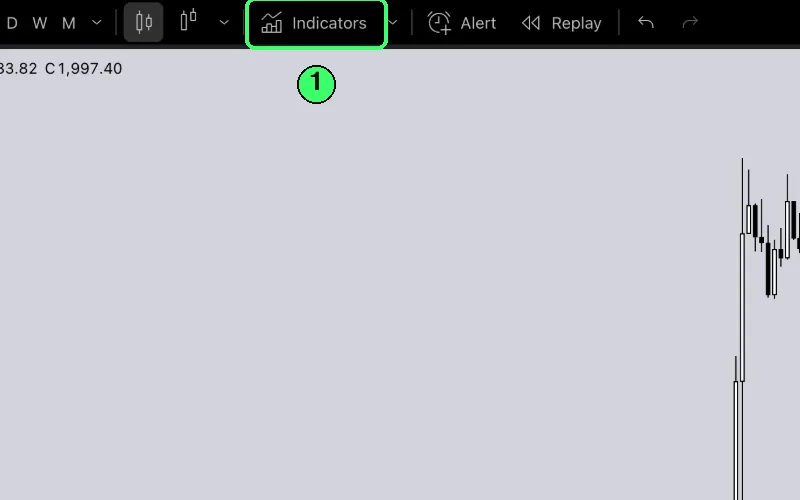
1Click Indicators
On any TradingView chart, open Indicators in the top toolbar.
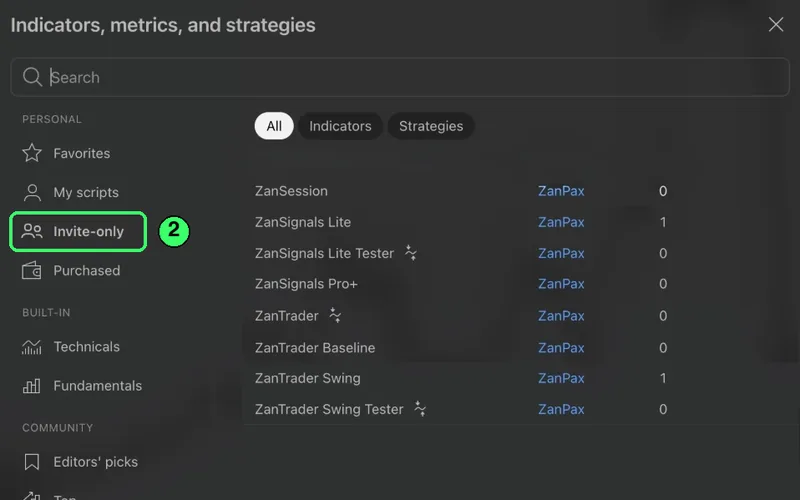
2Open Invite-only
Choose Invite-only in the left menu. The ZanSignals scripts in your plan are listed there.
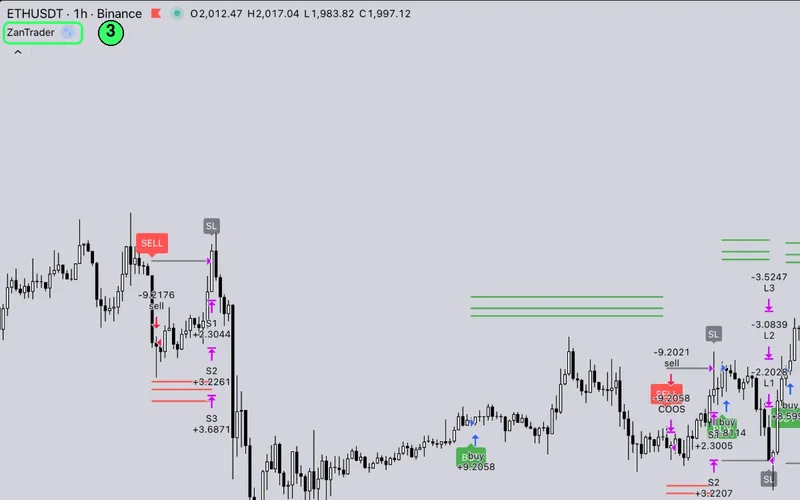
3Add it to your chart
Click a script to add it. Its name appears on the chart, with a gear icon for settings.
Up-to-date ZanTrader settings are waiting in your dashboard after you sign up and confirm your email.
Then see how it performs
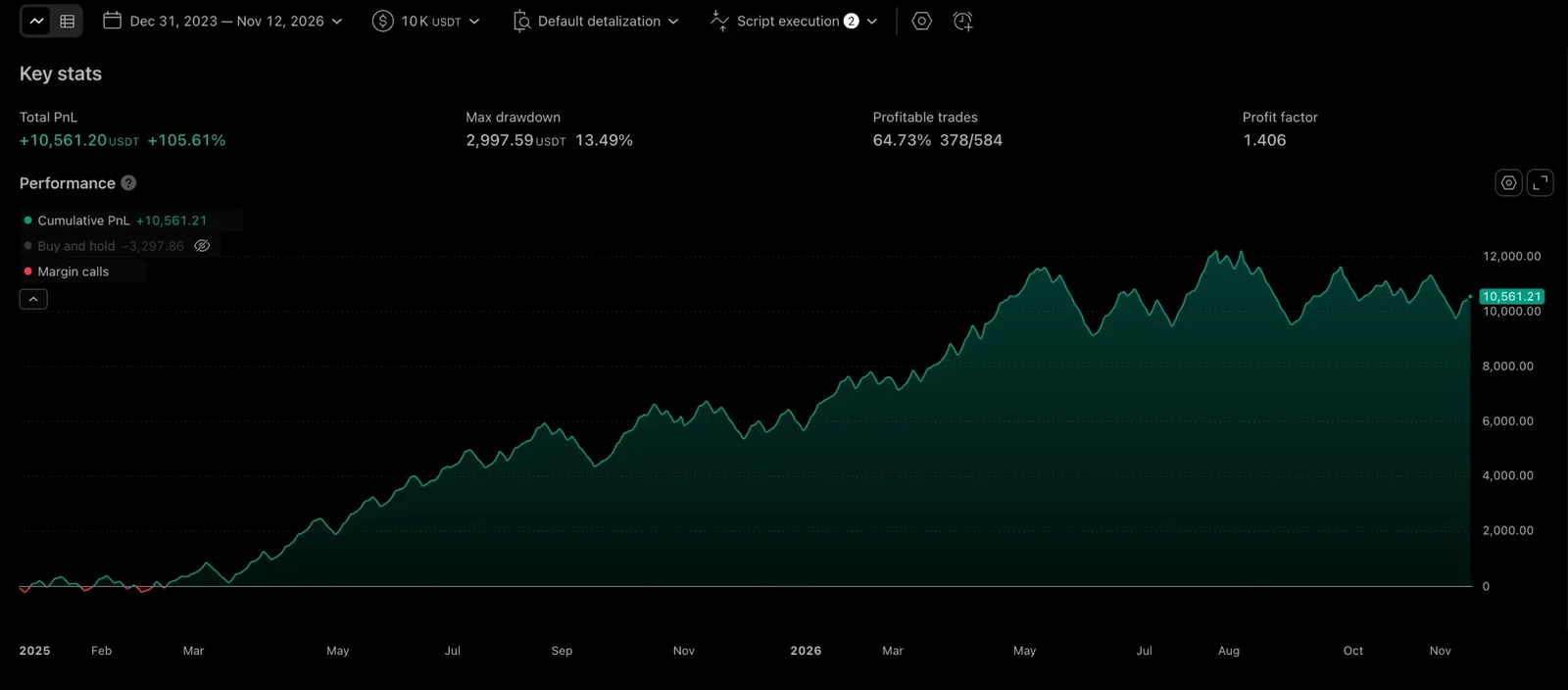
Strategy scripts include a built-in report: open the Strategy Tester at the bottom of the chart and check the results yourself.
One toolkit. Three ways to trade it.
Signals to read the chart, automation to execute it, testers to prove it.
ZanTrader
Trailing stop, DCA, break-even and 20 alert messages in Cornix style for Telegram or any webhook. Baseline adds a 27-type trend filter.
ZanSignals
BUY/SELL labels with TP1–4 and Stop Loss. Lite for a clean start, Pro+ with a 0–15 confluence index and automatic trendlines.
ZanSession
Asia, Europe and America sessions on your chart, so you know when the market is actually moving.
Testers
Backtest the same logic on any symbol with TradingView Strategy Tester before risking a cent.
Mobile & Telegram
Every signal can fire a TradingView alert to your phone, a Telegram bot or your own webhook.
Tune it once. See it on your chart.
The indicators are fully configurable, and results depend on the settings, the pair and the timeframe. We publish tuned setups together with the exact conditions of every backtest, and we are adding more major pairs as each one is verified.
TradingView Strategy Tester, tuned settings. Win rate is counted per signal, not per partial close. In real trading, remember commission and slippage: they can differ from the test settings and reduce results. Past performance does not guarantee future results. Not financial advice.
Pick your toolkit
Start with a free 7-day trial. Upgrade any time from your dashboard.
Learn to trade with tools
- ZanSession — Asia / Europe / America sessions with high and low lines
- ZanSignals Lite — BUY/SELL labels with TP1–TP4 and Stop Loss
- ZanSignals Lite Tester — backtest Lite in the TradingView Strategy Tester
- Trend filter, Long/Short mode and optional break-even stop
- 17 alert types: entries, every TP and Stop Loss
- Crypto, forex and stocks, best on 1H to 1D
Built for automation
- Everything in Starter
- ZanTrader — flagship strategy with a built-in backtest
- 20 alert messages in Cornix style for bots and webhooks
- Extra DCA entry, break-even and trailing stop
- TP1–TP4 and Stop Loss for Long and Short, in %, pips or ATR
- Dual trend filter, SuperTrend and MultiMA filters, plus a session filter
- ZanTrader Baseline — 27 moving-average trend filter
Everything we build, first
- Everything in Pro
- ZanSignals Pro+ — Stochastic RSI signals with a 0–15 confluence index
- Pro+ also adds automatic trendlines, Entry Blocks, divergences and a 2nd/3rd entry
- ZanTrader Swing — rare swing signals for 4H and daily charts
- ZanTrader Swing Tester — backtest Swing with a Stop Loss
- Private Telegram group — tuned settings, new indicators and research before the public release
All plans include TradingView invite-only access, granted manually within a few hours · 24-hour money-back guarantee on monthly plans
Questions, answered
How do I get access after signing up or paying?
Is there a free trial?
Which TradingView plan do I need?
I have no trading experience. Can I still use this?
Do the indicators repaint?
Can I use the indicators for automated trading?
Can I customise signal frequency and parameters?
How are backtest results calculated?
What is the difference between the plans? Can I upgrade?
What is your refund policy?
Put the tools on your chart today.
7 days free. No card. Access granted manually, usually within a few hours.
ZanSignals provides technical-analysis tools only. It is not an investment firm and does not give financial advice. Trading carries a high risk of loss. Backtested and historical results do not guarantee future performance. Read the full disclaimer.